Fundamentals
Showpad communicates with your CRM connector via HTTPS requests and JSON responses. This page covers authentication, request payloads, and error handling.
- Verify requests? Validate the
x-showpad-signature-v1header using HMAC-SHA256 - Identify users? Every request includes
showpadInfowith subdomain, username, and connector ID - Handle errors? Return appropriate HTTP codes and include
errorMessagefor debugging - Timeout limit? Respond within 15 seconds or Showpad displays an error
Authorization and security
Showpad signs every request with an HMAC-SHA256 signature. Your middleware must verify this signature to ensure requests are authentic and haven't been tampered with.
Signature headers
Every request includes two headers:
| Header | Description |
|---|---|
x-showpad-signature-timestamp | Unix epoch timestamp (seconds) when the request was sent |
x-showpad-signature-v1 | Comma-separated Base64 HMAC-SHA256 signatures |
x-showpad-signature-v1: FLauBV44UFC2oeY8AHcvGiUaL1Bx+FU5o+6ZM8KBdo0=,jR7SyZM0zpyYdOGZ1tOsv1av1RTmx3RzQyEKu7nHTUg=
x-showpad-signature-timestamp: 1668017345
Verification steps
- Check timestamp - Reject requests older than 5 minutes to prevent replay attacks
- Build signed payload - Concatenate:
{request_body}.{timestamp} - Compute HMAC - Generate HMAC-SHA256 using your Endpoint Signature Secret (from Admin App)
- Compare signatures - Request is valid if your hash matches any signature in the header
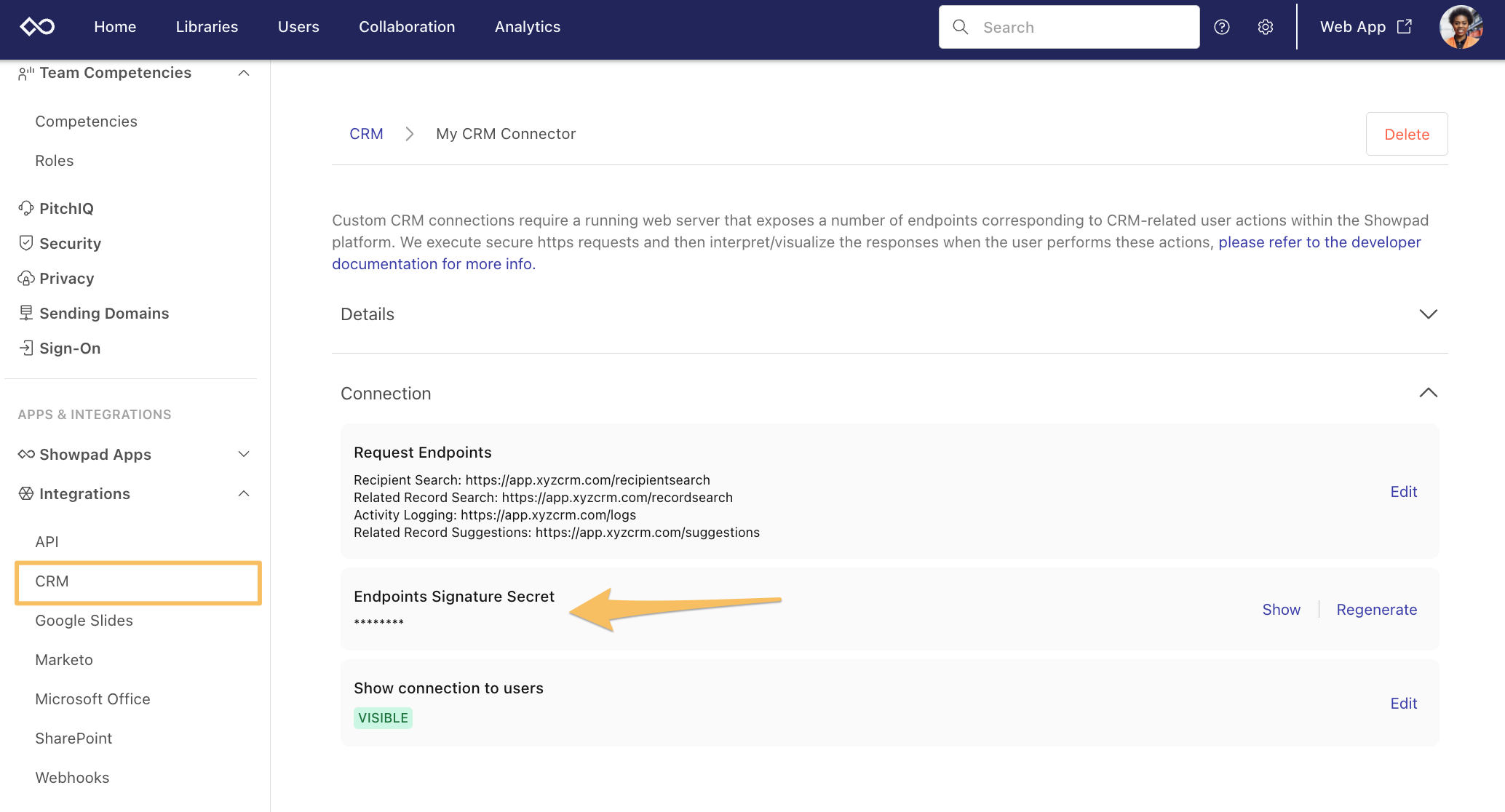
Get your signature secret
In the Admin App, go to Settings > Integrations > CRM > select your connector > copy the Endpoints Signature Secret.
Code examples
- JavaScript
- Python
- C#
const crypto = require('crypto');

function verifySignature(req, secret) {
  const timestamp = req.headers['x-showpad-signature-timestamp'];
  const signatures = req.headers['x-showpad-signature-v1'].split(',');

  // Step 1: Check timestamp (reject if older than 5 minutes)
  const now = Math.floor(Date.now() / 1000);
  if (now - parseInt(timestamp) > 300) {
    return false;
  }

  // Step 2: Build signed payload
  const body = JSON.stringify(req.body);
  const signedPayload = `${body}.${timestamp}`;

  // Step 3: Compute HMAC-SHA256
  const expectedSignature = crypto.createHmac('sha256', secret).update(signedPayload).digest('base64');

  // Step 4: Compare signatures
  return signatures.includes(expectedSignature);
}
import hmac
import hashlib
import base64
import time
import json

def verify_signature(request, secret):
    timestamp = request.headers.get('x-showpad-signature-timestamp')
    signatures = request.headers.get('x-showpad-signature-v1').split(',')

    # Step 1: Check timestamp (reject if older than 5 minutes)
    if time.time() - int(timestamp) > 300:
        return False

    # Step 2: Build signed payload
    body = json.dumps(request.get_json(), separators=(',', ':'))
    signed_payload = f"{body}.{timestamp}"

    # Step 3: Compute HMAC-SHA256
    expected = base64.b64encode(
        hmac.new(secret.encode(), signed_payload.encode(), hashlib.sha256).digest()
    ).decode()

    # Step 4: Compare signatures
    return expected in signatures
using System.Security.Cryptography;
using System.Text;

public bool VerifySignature(HttpRequest request, string secret)
{
    var timestamp = request.Headers["x-showpad-signature-timestamp"].ToString();
    var signatures = request.Headers["x-showpad-signature-v1"].ToString().Split(',');

    // Step 1: Check timestamp (reject if older than 5 minutes)
    var now = DateTimeOffset.UtcNow.ToUnixTimeSeconds();
    if (now - long.Parse(timestamp) > 300) return false;

    // Step 2: Build signed payload
    using var reader = new StreamReader(request.Body);
    var body = reader.ReadToEnd();
    var signedPayload = $"{body}.{timestamp}";

    // Step 3: Compute HMAC-SHA256
    using var hmac = new HMACSHA256(Encoding.UTF8.GetBytes(secret));
    var hash = hmac.ComputeHash(Encoding.UTF8.GetBytes(signedPayload));
    var expected = Convert.ToBase64String(hash);

    // Step 4: Compare signatures
    return signatures.Contains(expected);
}
Always verify signatures before processing requests. Skipping verification exposes your CRM to unauthorized access.
Identification
Every request includes a showpadInfo object in the POST body that identifies the organization and user:
{
  "showpadInfo": {
    "subdomain": "myorg",
    "username": "user@company.com",
    "crmInstanceId": "dsflkj2349fddd9asdf"
  }
}
| Property | Description |
|---|---|
subdomain | Your Showpad organization subdomain |
username | The current user's email address in Showpad. Map this to the corresponding CRM user. |
crmInstanceId | Unique identifier for this CRM connector. Useful if you have multiple connectors. |
We recommend requiring that Showpad user email addresses match exactly with email addresses in your CRM system. This simplifies user mapping and avoids lookup failures.
Response codes
Return standard HTTP status codes with your responses:
| Code | When to use |
|---|---|
200 | Request processed successfully |
201 | Record created (e.g., activity logged) |
4xx | Client error (invalid request, unauthorized, etc.) |
5xx | Server error (CRM unavailable, internal error, etc.) |
See HTTP response codes for more details.
Error handling
When your connector returns a non-success code, include an errorMessage to help users troubleshoot:
{
  "errorMessage": "CRM System XYZ responded with a USER_UNAUTHORIZED code"
}
Showpad displays this message in the Admin App when available.
Common error scenarios
| Scenario | Recommended response |
|---|---|
| User not found in CRM | 400 with "errorMessage": "No CRM user found for user@company.com" |
| CRM authentication failed | 401 with "errorMessage": "CRM authentication failed. Check API credentials." |
| Rate limited by CRM | 429 with "errorMessage": "CRM rate limit exceeded. Try again in X seconds." |
| CRM unavailable | 503 with "errorMessage": "CRM service unavailable" |
Timeouts
Showpad times out requests after 15 seconds. To avoid timeout errors:
- Cache frequently accessed CRM data
- Use efficient CRM queries
- Implement pagination for large result sets
- Consider async processing for slow operations
Aim for response times under 2 seconds for the best user experience. Users searching for contacts expect near-instant results.
Next steps
- Configuration - Set up your connector in the Admin App
- Endpoint Reference - Complete API specification
Was this page helpful?