API Fundamentals
This guide covers the core concepts you need to understand when working with the Showpad API. Once you're comfortable with these basics, you'll be ready to start making API requests.
What you'll learn:
- How REST APIs work with requests and responses
- HTTP methods, headers, and query parameters
- Response codes and what they mean
What is the Showpad API?
An API (application programming interface) is a set of rules that define how applications or devices can connect to and communicate with each other. A REST API is an API that conforms to the design principles of the REST (Representational State Transfer) architectural style.
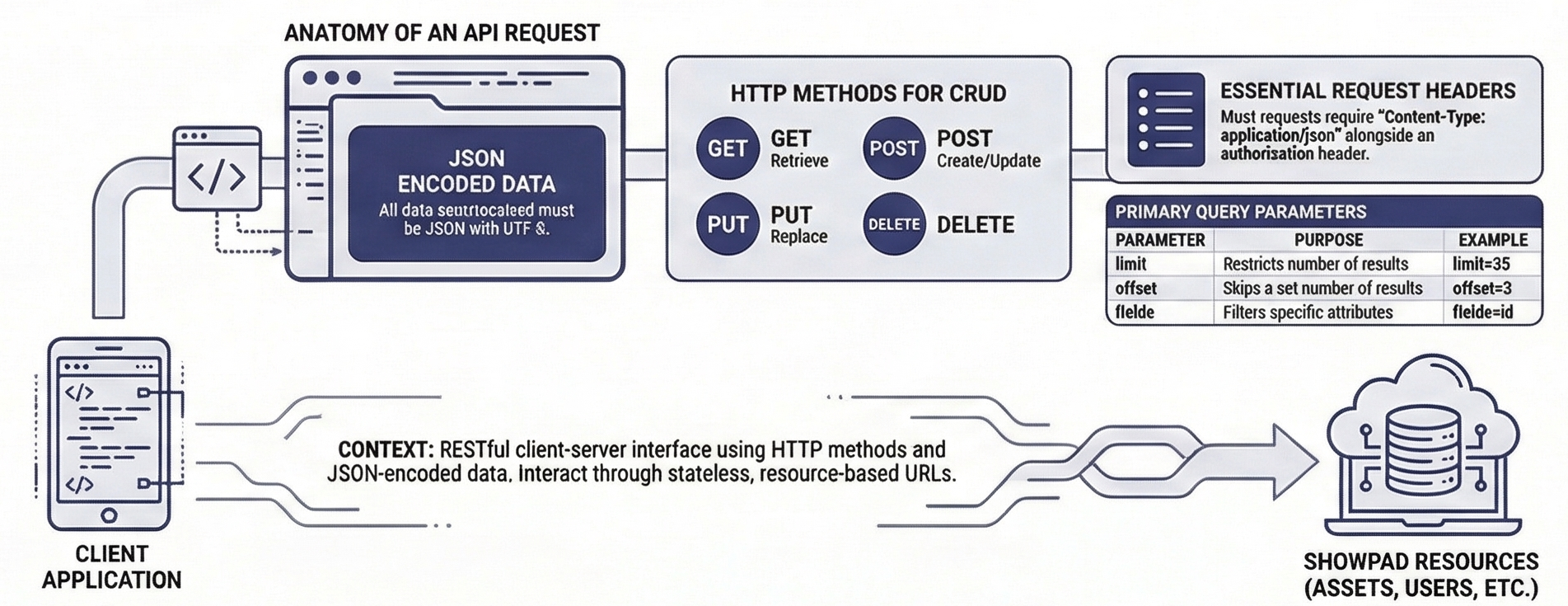
The Showpad API is a RESTful client-server API, a software architecture that allows communication between clients and servers over the Internet using HTTP methods, with a focus on stateless interactions and resource-based URLs.
A resource is the core entity within the Showpad API. It is defined by an ID, a type, a collection of attributes, and a series of relationships connecting it to other resources.
Quick Example
Here's what a typical API interaction looks like: a request to fetch assets and the response you'd receive.
Request
- cURL
- JavaScript
- Python
curl -X GET "https://{subdomain}.showpad.biz/api/v3/assets.json?limit=2" \
  -H "Authorization: Bearer {access_token}"
const response = await fetch('https://{subdomain}.showpad.biz/api/v3/assets.json?limit=2', {
  method: 'GET',
  headers: {
    Authorization: 'Bearer {access_token}',
  },
});

const data = await response.json();
console.log(data);
import requests

url = "https://{subdomain}.showpad.biz/api/v3/assets.json"
params = {"limit": 2}
headers = {"Authorization": "Bearer {access_token}"}

response = requests.get(url, params=params, headers=headers)
print(response.json())
Response
{
  "meta": { "count": 2 },
  "response": {
    "items": [
      { "id": "abc123", "name": "Product Overview" },
      { "id": "def456", "name": "Sales Deck" }
    ]
  }
}
The rest of this guide breaks down each part of this interaction.
Requests
In a basic REST API setup, a client sends an HTTP request to the Showpad server via a URL, which processes it and answers with an HTTP response. The URL identifies which resource or collection of resource links you want to access.
Data Format
All data sent to or received from the Showpad API must be in JSON encoded with UTF-8.
{
  "name": "My Asset",
  "description": "A sample asset"
}
HTTP Methods
Showpad uses the following HTTP methods to map CRUD (Create, Retrieve, Update, Delete) operations to HTTP requests.
| Method | Description |
|---|---|
GET | Retrieves the representation of a single resource or a list of resources. |
HEAD | Same as GET, but without the response body. |
POST | Creates or updates an instance of a resource. |
PUT | Updates or replaces an existing resource. |
DELETE | Deletes an instance of a resource. |
Request Headers
Request headers carry extra information within the HTTP header of a request, providing crucial details and configurations.
For most API requests, you'll use Content-Type: application/json along with your authorization header.
The following table describes the available values for the Content-Type parameter:
| Content Type | Notes |
|---|---|
application/www-url-encoded | Used to submit data in key-value pairs encoded as a URL string. Suitable for simple data updates. |
multipart/form-data | Used to submit data in a structured format, including files. Suitable for uploading files or complex data. |
application/json | Used to submit data in JSON format. Suitable for structured data that needs to be parsed and processed by the server. |
See the specifications for API v3 and API v4 to know which header is supported for which API.
Query Parameters
You can include parameters in your requests to control the returned data. Query parameters are attached to the end of the URL path.
// Example: Get 25 assets, skipping the first 10
GET /api/v3/assets.json?limit=25&offset=10
| Parameter | Request Type | Description | Example |
|---|---|---|---|
limit | GET ResourceLink Collection | Limits the number of retrieved resources. | A limit of 25 will only return 25 resources. |
offset | GET ResourceLink Collection | Offsets the retrieved Resource Links. | An offset of 3 will skip the first three results. |
fields | GET Resource or GET ResourceLink Collection | A comma separated list of attributes to be returned in the response. Typically used to make the response lighter. | Specifying id as a field parameter would retrieve a collection containing only ids. |
Response Codes
Showpad uses conventional HTTP response codes to indicate the success or failure of an API request.
- 2xx = Success ✓
- 4xx = Client error (check your request)
- 5xx = Server error (try again later)
2xx Codes
| Code | Name | Description |
|---|---|---|
200 | OK | The request was successful. |
201 | Created | The resource was created. |
202 | Accepted | The request was accepted. Processing will happen asynchronously (in the background). |
4xx Codes
| Code | Name | Description |
|---|---|---|
400 | Bad Request | The request is malformed. |
401 | Unauthorized | The request lacks valid authentication credentials. |
403 | Forbidden | The request uses credentials that are not authorized for access. |
404 | Not Found | The requested resource could not be found. |
405 | Method Not Found | Returned when an invalid HTTP method is used. |
409 | Conflict | The request conflicts with the current data. |
429 | Too Many Requests | Too many requests have been sent within a specific amount of time. Wait before retrying and check the response headers for retry timing information. |
5xx Codes
| Code | Name | Description |
|---|---|---|
500 | Internal Server Error | The server encountered an unexpected condition that prevented it from fulfilling the request. |
Next Steps
Now that you understand the basics, explore these related topics:
- API Versions - Choose the right version for your integration
- Authentication - Set up OAuth2 and manage API tokens
- API Reference - Full endpoint specifications
Was this page helpful?