CRM Recommendation Rules
Recommendation rules define which assets are recommended to your sales reps based on CRM context. Administrators create rules that link Showpad content tags with CRM field values. When conditions match, relevant content surfaces as recommendations.
What you'll learn
- How to create and manage CRM recommendation rules
- How to link Showpad tags with CRM field values
- How to use operators to define matching conditions
- Create a rule? Use
POST /crm/recommendations/ruleswith conditions and tags - List all rules? Use
GET /crm/recommendations/rules?crmInstanceId=... - Get one rule? Use
GET /crm/recommendations/rules/{ruleId} - Update a rule? Use
PUT /crm/recommendations/rules/{ruleId} - Delete a rule? Use
DELETE /crm/recommendations/rules/{ruleId}
When to use the API
| Contextual Recommendations | Bulk Rule Management | CRM Sync | Custom Integrations |
|---|---|---|---|
| Surface relevant content based on opportunity stage, industry, or other CRM fields. | Programmatically create or update rules across your organization. | Keep recommendation rules in sync with CRM configuration changes. | Build recommendation logic into your own sales tools. |
- Plan: Ultimate | Advanced or Expert
- Permissions: Administrator access to Showpad's Admin App
- Authentication: Valid OAuth 2.0 access token (learn more)
- Config: A Salesforce instance integrated with Showpad
How Rules Work
Recommendation rules link Showpad content tags with CRM field values. When conditions in a rule are met, content with the designated tag is displayed as recommendations.
Example
When a sales rep works with a Lead in the Energy sector of the Industry field in Salesforce, assets with the Power2023 tag are recommended.
{
  "conditions": [
    {
      "items": [
        {
          "fieldName": "Industry",
          "objectName": "Lead",
          "operator": "equals",
          "value": "Energy"
        }
      ]
    }
  ],
  "tags": {
    "all": ["ba16a6afc2d4247862c9986aa09772fd"]
  }
}
In this example, ba16a6afc2d4247862c9986aa09772fd is the tag ID for "Power2023".
You can manage your Recommendation Rules for Salesforce in the Showpad Admin App. This Help Center article provides all the details.
Base Endpoint
Every request must be prefixed with the base endpoint:
https://{{subdomain}}.api.showpad.com/v4
CRM Recommendation Rules use Showpad API v4. Your calls use the base endpoint + the resource path:
https://{{subdomain}}.api.showpad.com/v4/crm/recommendations/rules
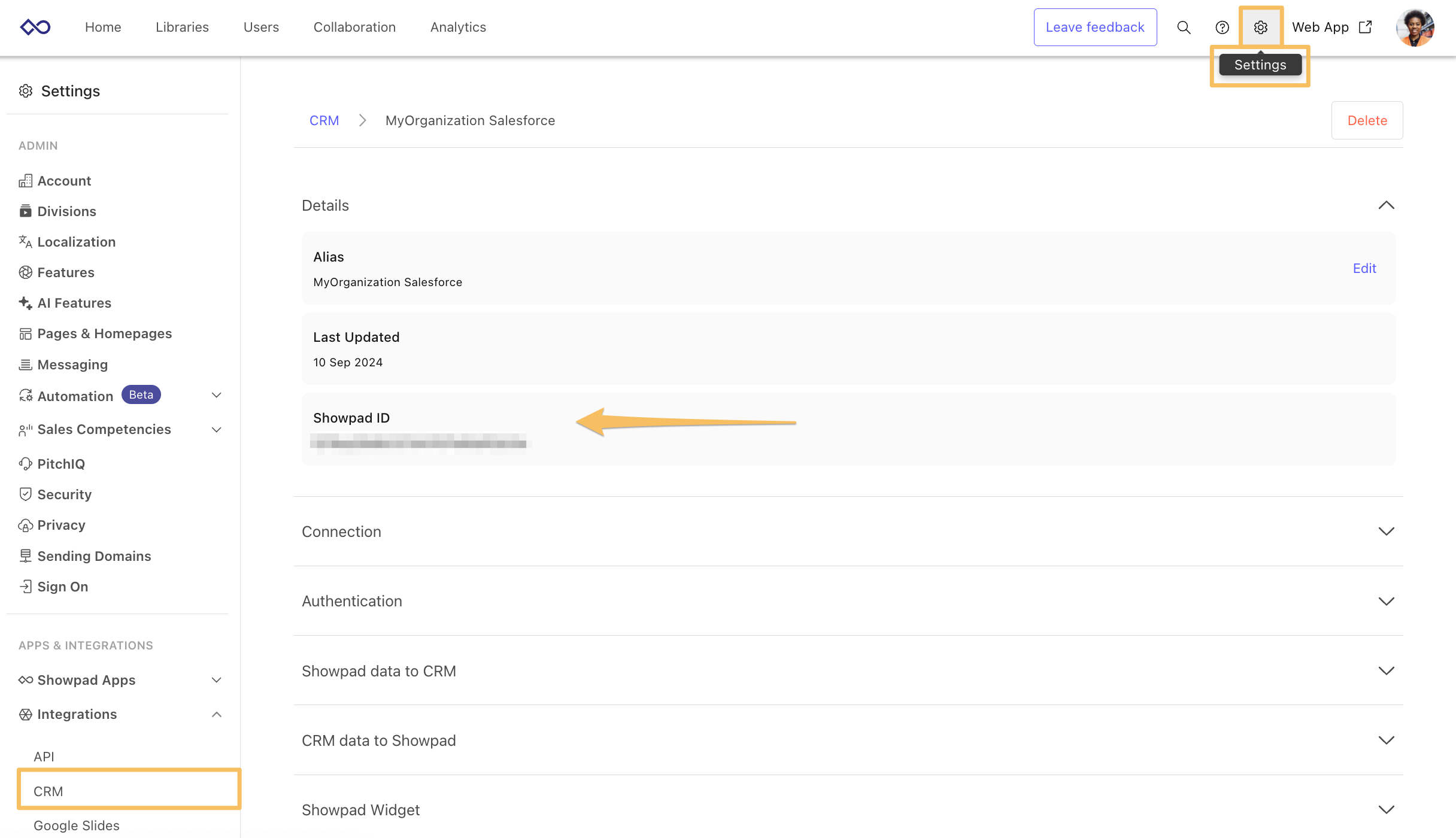
CRM Instance ID
The crmInstanceId is used to identify the Salesforce instance you've integrated with Showpad. You can get your
instance identifier by viewing the Details in the Integrations > CRM section of the Showpad Admin App:
Request Body
The database definitions described in the table below are used to specify the conditions that must be met within your CRM for the following request types:
| Item | Data Type | Description |
|---|---|---|
objectName | string | The main object type. |
childObjectName | string | optional A subordinate of the main object. |
fieldName | string | A specific field within the main or child object. |
operator | string | How the fieldName and the value are evaluated.Available values:
|
value | string | This specific information you want to work with. |
Tags
You can refine your requests by specifying Showpad tags to specify that the rule only applies to assets with the
designated tag(s).
Three options are available for defining how to match assets with the tags:
-
all - An asset must contain every one of the tags listed.
-
any - An asset must contain at least one of the tags listed.
-
none - An asset must not contain any of the tags listed.
Create Rule
Create a recommendation rule:
| Method | Endpoint | Description |
|---|---|---|
POST | /crm/recommendations/rules | Creates a CRM recommendation rule. |
Example
This rule recommends assets tagged "big_bone" when a sales rep works with an Opportunity where chewToys equals
"bigBone".
- cURL
- JavaScript
- Python
curl -X POST "https://{{subdomain}}.api.showpad.com/v4/crm/recommendations/rules" \
  -H "Authorization: Bearer {access_token}" \
  -H "Content-Type: application/json" \
  -d '{
    "crmInstanceId": "5708b5480060c466a05c98522472df32",
    "conditions": [
        {
            "items": [
                {
                    "objectName": "opportunity",
                    "childObjectName": "dogToys",
                    "fieldName": "chewToys",
                    "operator": "equals",
                    "value": "bigBone"
                }
            ]
        }
    ],
    "tags": {
        "all": ["big_bone"],
        "any": [],
        "none": []
    }
}'
const response = await fetch('https://{{subdomain}}.api.showpad.com/v4/crm/recommendations/rules', {
  method: 'POST',
  headers: {
    Authorization: 'Bearer {access_token}',
    'Content-Type': 'application/json',
  },
  body: JSON.stringify({
    crmInstanceId: '5708b5480060c466a05c98522472df32',
    conditions: [
      {
        items: [
          {
            objectName: 'opportunity',
            childObjectName: 'dogToys',
            fieldName: 'chewToys',
            operator: 'equals',
            value: 'bigBone',
          },
        ],
      },
    ],
    tags: {
      all: ['big_bone'],
      any: [],
      none: [],
    },
  }),
});
const rule = await response.json();
import requests

response = requests.post(
    'https://{{subdomain}}.api.showpad.com/v4/crm/recommendations/rules',
    headers={
        'Authorization': 'Bearer {access_token}',
        'Content-Type': 'application/json'
    },
    json={
        'crmInstanceId': '5708b5480060c466a05c98522472df32',
        'conditions': [
            {
                'items': [
                    {
                        'objectName': 'opportunity',
                        'childObjectName': 'dogToys',
                        'fieldName': 'chewToys',
                        'operator': 'equals',
                        'value': 'bigBone'
                    }
                ]
            }
        ],
        'tags': {
            'all': ['big_bone'],
            'any': [],
            'none': []
        }
    }
)
rule = response.json()
Example Response
{
  "id": "01H9TERHN6Z0AHENMV14K5YKPR",
  "crmInstanceId": "5708b5480060c466a05c98522472df32",
  "conditions": [
    {
      "items": [
        {
          "objectName": "opportunity",
          "childObjectName": "dogToys",
          "fieldName": "chewToys",
          "operator": "equals",
          "value": "bigBone"
        }
      ]
    }
  ],
  "tags": {
    "all": ["big_bone"],
    "any": [],
    "none": []
  },
  "createdAt": "2023-09-08T13:12:36.000Z",
  "updatedAt": "2023-09-08T13:12:36.000Z"
}
Retrieve Rules
Specific CRM Instance
Retrieve all recommendation rules for a Salesforce instance:
| Method | Endpoint | Description |
|---|---|---|
GET | /crm/recommendations/rules | Returns all CRM recommendation rules for the specified CRM instance. |
Example
- cURL
- JavaScript
- Python
curl "https://{{subdomain}}.api.showpad.com/v4/crm/recommendations/rules?crmInstanceId=5708b5480060c466a05c98522472df32" \
  -H "Authorization: Bearer {access_token}"
const response = await fetch(
  'https://{{subdomain}}.api.showpad.com/v4/crm/recommendations/rules?crmInstanceId=5708b5480060c466a05c98522472df32',
  {
    headers: { Authorization: 'Bearer {access_token}' },
  }
);
const rules = await response.json();
import requests

response = requests.get(
    'https://{{subdomain}}.api.showpad.com/v4/crm/recommendations/rules',
    params={'crmInstanceId': '5708b5480060c466a05c98522472df32'},
    headers={'Authorization': 'Bearer {access_token}'}
)
rules = response.json()
Example Response
{
  "count": 2,
  "items": [
    {
      "id": "01H9FK4CRME24PVVNM1JR8T1ZE",
      "crmInstanceId": "5708b5480060c466a05c98522472df32",
      "conditions": [
        {
          "items": [
            {
              "objectName": "opportunity",
              "childObjectName": "dogToys",
              "fieldName": "chewToys",
              "value": "bigBone",
              "operator": "equals"
            }
          ]
        }
      ],
      "tags": {
        "all": [],
        "any": ["951aca1a3576e1d1488f29e74756ee60"],
        "none": []
      },
      "createdAt": "2023-09-04T07:57:20.000Z",
      "updatedAt": "2023-09-05T07:29:41.000Z"
    }
  ]
}
Specific Rule ID
Retrieve a single recommendation rule by ID:
| Method | Endpoint | Description |
|---|---|---|
GET | /crm/recommendations/rules/{ruleId} | Returns the recommendation rule for the specified identifier. |
Example
- cURL
- JavaScript
- Python
curl "https://{{subdomain}}.api.showpad.com/v4/crm/recommendations/rules/01H9TERHN6Z0AHENMV14K5YKPR" \
  -H "Authorization: Bearer {access_token}"
const response = await fetch(
  'https://{{subdomain}}.api.showpad.com/v4/crm/recommendations/rules/01H9TERHN6Z0AHENMV14K5YKPR',
  {
    headers: { Authorization: 'Bearer {access_token}' },
  }
);
const rule = await response.json();
import requests

response = requests.get(
    'https://{{subdomain}}.api.showpad.com/v4/crm/recommendations/rules/01H9TERHN6Z0AHENMV14K5YKPR',
    headers={'Authorization': 'Bearer {access_token}'}
)
rule = response.json()
Example Response
{
  "id": "01H9TERHN6Z0AHENMV14K5YKPR",
  "crmInstanceId": "5708b5480060c466a05c98522472df32",
  "conditions": [
    {
      "items": [
        {
          "objectName": "lead",
          "childObjectName": "dog_food",
          "fieldName": "k9",
          "operator": "contains",
          "value": "kibble"
        }
      ]
    }
  ],
  "tags": {
    "all": ["beef"],
    "any": [],
    "none": []
  },
  "createdAt": "2023-09-08T13:12:36.000Z",
  "updatedAt": "2023-09-08T13:12:36.000Z"
}
Update Rule
Update a recommendation rule:
| Method | Endpoint | Description |
|---|---|---|
PUT | /crm/recommendations/rules/{ruleId} | Modifies the recommendation rule with the specified identifier. |
Example
- cURL
- JavaScript
- Python
curl -X PUT "https://{{subdomain}}.api.showpad.com/v4/crm/recommendations/rules/01H9TERHN6Z0AHENMV14K5YKPR" \
  -H "Authorization: Bearer {access_token}" \
  -H "Content-Type: application/json" \
  -d '{
    "id": "01H9TERHN6Z0AHENMV14K5YKPR",
    "crmInstanceId": "5708b5480060c466a05c98522472df32",
    "conditions": [
        {
            "items": [
                {
                    "objectName": "lead",
                    "childObjectName": "dog_food",
                    "fieldName": "k9",
                    "operator": "contains",
                    "value": "kibble"
                }
            ]
        }
    ],
    "tags": {
        "all": ["chicken"],
        "any": [],
        "none": []
    }
}'
const response = await fetch(
  'https://{{subdomain}}.api.showpad.com/v4/crm/recommendations/rules/01H9TERHN6Z0AHENMV14K5YKPR',
  {
    method: 'PUT',
    headers: {
      Authorization: 'Bearer {access_token}',
      'Content-Type': 'application/json',
    },
    body: JSON.stringify({
      id: '01H9TERHN6Z0AHENMV14K5YKPR',
      crmInstanceId: '5708b5480060c466a05c98522472df32',
      conditions: [
        {
          items: [
            {
              objectName: 'lead',
              childObjectName: 'dog_food',
              fieldName: 'k9',
              operator: 'contains',
              value: 'kibble',
            },
          ],
        },
      ],
      tags: {
        all: ['chicken'],
        any: [],
        none: [],
      },
    }),
  }
);
const updatedRule = await response.json();
import requests

response = requests.put(
    'https://{{subdomain}}.api.showpad.com/v4/crm/recommendations/rules/01H9TERHN6Z0AHENMV14K5YKPR',
    headers={
        'Authorization': 'Bearer {access_token}',
        'Content-Type': 'application/json'
    },
    json={
        'id': '01H9TERHN6Z0AHENMV14K5YKPR',
        'crmInstanceId': '5708b5480060c466a05c98522472df32',
        'conditions': [
            {
                'items': [
                    {
                        'objectName': 'lead',
                        'childObjectName': 'dog_food',
                        'fieldName': 'k9',
                        'operator': 'contains',
                        'value': 'kibble'
                    }
                ]
            }
        ],
        'tags': {
            'all': ['chicken'],
            'any': [],
            'none': []
        }
    }
)
updated_rule = response.json()
Example Response
{
  "id": "01H9TERHN6Z0AHENMV14K5YKPR",
  "crmInstanceId": "5708b5480060c466a05c98522472df32",
  "conditions": [
    {
      "items": [
        {
          "objectName": "lead",
          "childObjectName": "dog_food",
          "fieldName": "k9",
          "operator": "contains",
          "value": "kibble"
        }
      ]
    }
  ],
  "tags": {
    "all": ["chicken"],
    "any": [],
    "none": []
  },
  "createdAt": "2023-09-08T13:12:36.000Z",
  "updatedAt": "2023-09-08T13:18:26.000Z"
}
Delete Rule
Delete a recommendation rule:
| Method | Endpoint | Description |
|---|---|---|
DELETE | /crm/recommendations/rules/{ruleId} | Permanently removes the recommendation rule with the specified identifier. |
Example
- cURL
- JavaScript
- Python
curl -X DELETE "https://{{subdomain}}.api.showpad.com/v4/crm/recommendations/rules/01H9TERHN6Z0AHENMV14K5YKPR" \
  -H "Authorization: Bearer {access_token}"
const response = await fetch(
  'https://{{subdomain}}.api.showpad.com/v4/crm/recommendations/rules/01H9TERHN6Z0AHENMV14K5YKPR',
  {
    method: 'DELETE',
    headers: { Authorization: 'Bearer {access_token}' },
  }
);
// Returns 204 No Content on success
import requests

response = requests.delete(
    'https://{{subdomain}}.api.showpad.com/v4/crm/recommendations/rules/01H9TERHN6Z0AHENMV14K5YKPR',
    headers={'Authorization': 'Bearer {access_token}'}
)
# Returns 204 No Content on success
Next steps
- CRM Log History - Retrieve CRM activity logs for Shares and Shared Spaces
- CRM Integration Overview - Configure your CRM connection with Showpad
Was this page helpful?