Cross-Origin Resource Sharing (CORS)
If you're building a browser-based application that calls the Showpad API, you need to understand Cross-Origin Resource Sharing (CORS). This security feature controls which domains can make API requests from the browser.
What you'll learn:
- What CORS is and why it exists
- How Showpad enforces CORS policies
- How to add custom origins to the allow-list
- Default behavior? Only requests from your Showpad domain (
{{subdomain}}.showpad.bizor{{subdomain}}.showpad.com) are allowed - Custom domain needed? Contact Showpad support to add your domain to the allow-list
- Server-side apps? CORS doesn't apply. Make API calls directly from your backend.
- Plan: Ultimate, Advanced, or Expert
- Permissions: Administrator access (to submit requests to Showpad support)
What is CORS?
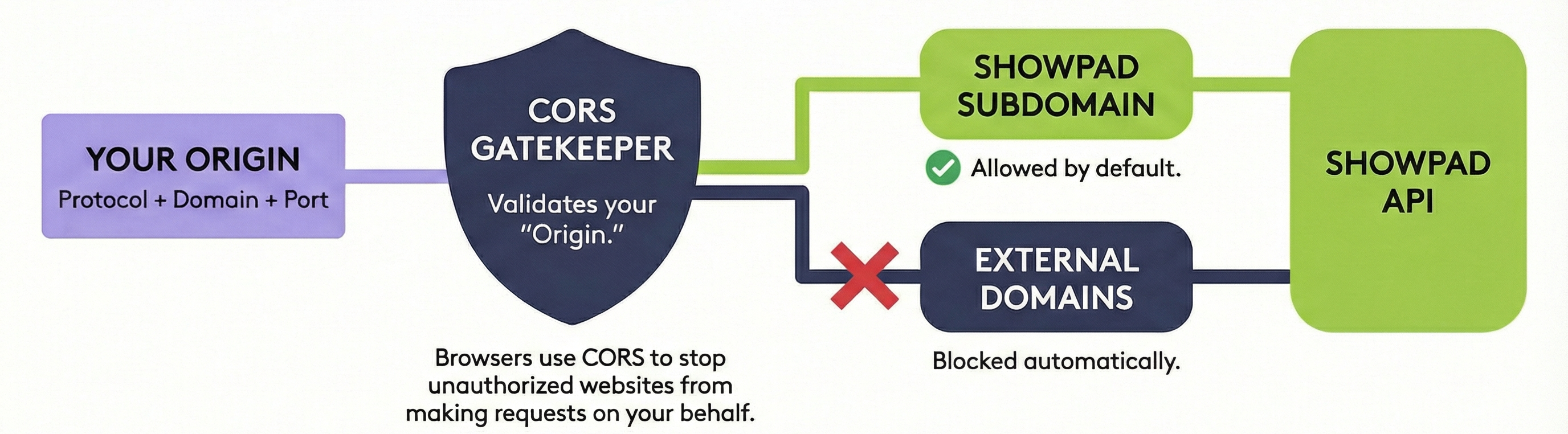
Cross-Origin Resource Sharing (CORS) is an HTTP-based security mechanism that lets a server specify which origins can access its resources.
What is an Origin?
An origin is the combination of:
- Protocol (e.g.,
https://) - Domain (e.g.,
app.example.com) - Port (e.g.,
:3000, if non-standard)
For example, https://app.example.com and https://api.example.com are different origins, even though they share the
same root domain.
Why Does CORS Exist?
By default, browsers block requests from an app running on a different origin than the server. This prevents malicious websites from making unauthorized API calls on behalf of users. To allow access, the server must explicitly permit the requesting origin.
How CORS Works
When your browser makes a cross-origin API request, here's what happens:
-
Simple requests (
GET,POSTwith standard headers): The browser sends the request and checks if the response includes anAccess-Control-Allow-Originheader matching your origin. -
Preflight requests (
PUT,DELETE, or custom headers): The browser first sends anOPTIONSrequest to check if the actual request is allowed. If the server responds with the appropriate CORS headers, the browser proceeds with the real request.
// Preflight request (sent automatically by browser)
OPTIONS /api/v4/users
Origin: https://{{app-domain}}
Access-Control-Request-Method: DELETE

// Server response (if allowed)
Access-Control-Allow-Origin: https://{{app-domain}}
Access-Control-Allow-Methods: GET, POST, PUT, DELETE
For in-depth technical details about CORS, see the MDN Web Docs.
CORS in Showpad
Showpad enforces a strict CORS policy: only requests originating from your authorized Showpad domain are permitted.
For example, when calling this endpoint from a browser:
GET https://{{subdomain}}.showpad.biz/api/v4/users
| Origin | Result |
|---|---|
https://{{subdomain}}.showpad.biz | ✅ Allowed |
https://{{subdomain}}.showpad.com | ✅ Allowed |
https://{{other-cust}}.showpad.com | ❌ Blocked |
https://{{app-domain}} | ❌ Blocked (unless added to allow-list) |
Adding Custom Origins
If you need to call the Showpad API from a browser app running on a non-Showpad domain, contact Showpad support to add your domain to the allow-list.
Include the following information in your request:
| Information | Example |
|---|---|
| Your Showpad instance | {{subdomain}}.showpad.biz |
| Origin to allow | https://{{app-domain}} or https://localhost:3000 |
Origins must include the protocol (https://) and port if applicable. Each origin must be added individually.
Troubleshooting
Common CORS Errors
If you see errors like these in your browser console, you're hitting a CORS restriction:
Access to fetch at 'https://{{subdomain}}.showpad.biz/api/v4/users' from origin 'https://{{app-domain}}'
has been blocked by CORS policy: No 'Access-Control-Allow-Origin' header is present.
Solutions
| Problem | Solution |
|---|---|
| Request blocked from custom domain | Contact Showpad support to add your origin to the allow-list |
Request blocked from localhost | Add your local development URL (e.g., https://localhost:3000) to the allow-list |
| CORS errors in server-side code | CORS only applies to browsers - check your authentication setup instead |
| Preflight request fails | Ensure you're using supported HTTP methods and headers |
If you're just testing, you can make API calls from your server-side code (Node.js, Python, etc.) instead of the browser. CORS restrictions only apply to browser-based JavaScript.
FAQ
Why doesn't CORS affect Postman or cURL?
CORS is enforced by browsers, not servers. Tools like Postman, cURL, and server-side code bypass CORS entirely because they don't implement the same-origin policy that browsers do.
Do I need to worry about CORS for server-side apps?
No. CORS only applies to JavaScript running in a browser. If your app makes API calls from a backend server (Node.js, Python, etc.), CORS doesn't apply.
Why is my localhost request blocked?
localhost origins must also be added to the allow-list. Contact Showpad support to add your local development URL
(e.g., https://localhost:3000).
Next Steps
- Error Codes - Handle API responses and troubleshoot issues
- Authentication - Ensure your tokens are configured correctly
- API Testing - Test requests directly in the documentation
Was this page helpful?