Showpad Query Language
Showpad Query Language (ShowQL) is a powerful and user-friendly query language. It enables you to retrieve the exact content (assets) you need from the Showpad Content library, with fine-grained filtering abilities. It's designed to help you effortlessly discover the exact assets you need within your Showpad Content library, while using a human-readable syntax.
What you'll learn:
- How to construct ShowQL queries using identifiers, operators, and values
- The supported operators and data types for filtering assets
- How to combine criteria and use advanced query patterns
- Find assets in a Division?
division = "divisionId". Use the Division's ID, not its name. - Filter by tag?
tag = "tagId". Supports=,!=, andINoperators. - Exclude archived?
AND isArchived = false. Archived assets are included by default. - Combine conditions?
AND/ORwith parentheses. Example:(tag = "a" OR tag = "b") AND isArchived = false
When to use the API
| Content Sync | Asset Discovery | Compliance Reporting | Smart Distribution |
|---|---|---|---|
| Query assets by Division, tags, or metadata to sync with external systems. | Find expiring or outdated content before it impacts your sales team. | Identify assets missing required metadata like language or country. | Build dynamic content recommendations based on real-time queries. |
Whether you're an experienced developer or new to Showpad, the following sections will guide you step by step through the process of effectively using ShowQL to meet your content search and filtering needs.
There are a few essential points to consider when working with ShowQL:
-
When referring to other objects, use their object IDs. For example, when querying Divisions, users, or tags, use the respective Division, user, or tag ID. Querying based on names is not supported.
-
Archived assets are included by default. If you want to exclude them, you need to explicitly do so in your query.
-
Personal assets are included by default in your results.
- Plan: Ultimate | Advanced or Expert
- Permissions: Administrator or Promoted Member access to Showpad's Admin App
- Authentication: Valid OAuth 2.0 access token (learn more)
Example Use Cases
ShowQL covers a wide range of use cases, providing great flexibility and control over asset retrieval. Here are some examples of how you can leverage ShowQL in your applications:
-
Asset Expiration Warnings: It can be quite useful to know which assets will be expiring soon. In the this query, we look for assets expiring within the next week:
expiresAt < 1w AND expiresAt > 0dThe query filters assets based on their expiration date, ensuring that you can take action before they expire.
-
Checking Empty Language and Country Fields: You can easily see if your Showpad Library is up to date by checking that your assets have the necessary language and country metadata. The following query lets you identify assets that are missing this information:
(languages IS EMPTY OR countries IS EMPTY) AND (archivedAt IS EMPTY)The query first searches for assets missing language or country information (the statement in parenthesis). Once it has that information, it then checks that those assets are not archived. You'll learn more about this kind of query in the combine criteria and operator precedence sections.
Base Endpoint
The base endpoint for ShowQL calls is:
https://{{subdomain}}.api.showpad.com/v4/assets/query
Every API v4 request needs to be prefixed with the base endpoint. For example, this is a ShowQL query looking for a specific Division:
Request
- cURL
- JavaScript
- Python
curl --request POST \
  --url 'https://{{subdomain}}.api.showpad.com/v4/assets/query' \
  --header 'Authorization: Bearer {{access_token}}' \
  --header 'Content-Type: application/json' \
  --data '{
    "query": "division = \"4643adcc1621814e91c489b34bb428ed\""
  }'
const response = await fetch('https://{{subdomain}}.api.showpad.com/v4/assets/query', {
  method: 'POST',
  headers: {
    Authorization: 'Bearer {{access_token}}',
    'Content-Type': 'application/json',
  },
  body: JSON.stringify({
    query: 'division = "4643adcc1621814e91c489b34bb428ed"',
  }),
});
const data = await response.json();
import requests

response = requests.post(
    "https://{{subdomain}}.api.showpad.com/v4/assets/query",
    headers={
        "Authorization": "Bearer {{access_token}}",
        "Content-Type": "application/json"
    },
    json={
        "query": 'division = "4643adcc1621814e91c489b34bb428ed"'
    }
)
data = response.json()
Response
{
  "items": [
    {
      "id": "a3e72bbfae0b87381106b1beb685ea88",
      "name": "Product Overview.pdf",
      "division": {
        "id": "4643adcc1621814e91c489b34bb428ed",
        "name": "Marketing"
      },
      "createdAt": "2024-01-15T10:30:00Z",
      "updatedAt": "2024-02-20T14:45:00Z"
    }
  ],
  "count": 1
}
Query Concepts
To create queries using ShowQL, it's important to understand the construction and logic of queries. This will ensure that you're able to use ShowQL more effectively in locating and filtering assets within your Showpad content Library.
Simple Queries
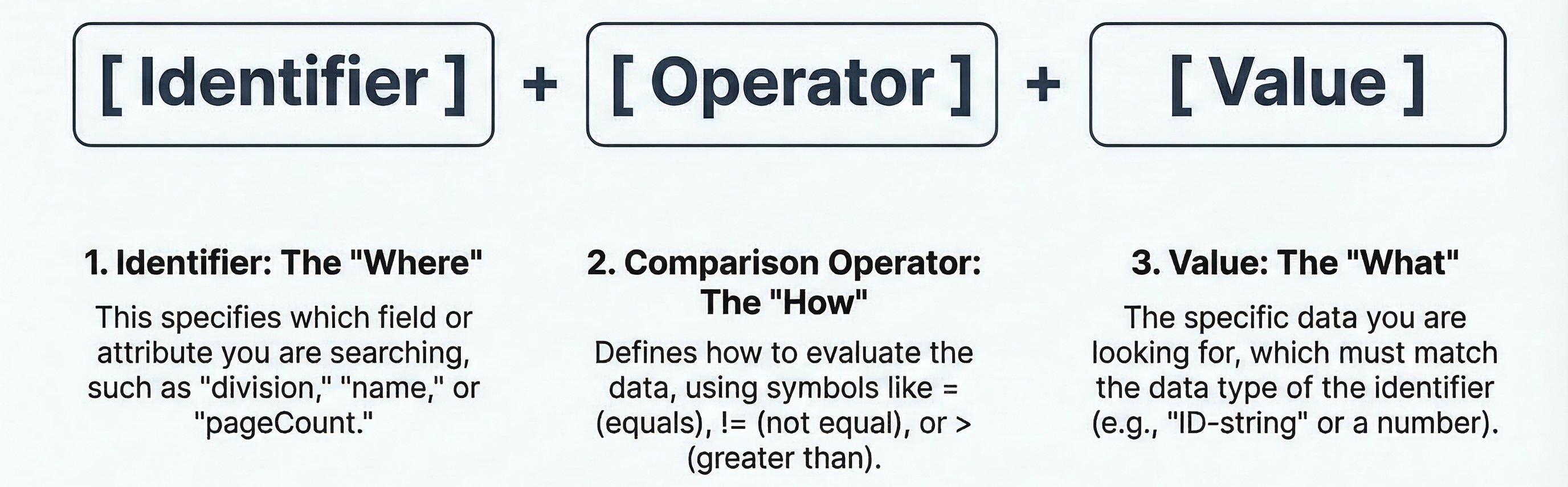
A simple query consists of:
| Identifier | Comparison Operator | Value |
|---|---|---|
| This specifies where the search will be performed. These are discussed in more detail in the Identifiers section. | This defines how the identifier and the value are evaluated. These are discussed in more detail in the Supported Operators section. | This is what your query is searching for. The value searched for must be the same data type as the identifier. These are discussed in more detail in the Data Types section. |
Example
This query will return all assets in the Division with ID: 4643adcc1621814e91c489b34bb428ed.
division = "4643adcc1621814e91c489b34bb428ed"
As you can see, this query has the required elements:
| Identifier | Comparison Operator | Value |
|---|---|---|
division | = | "4643adcc1621814e91c489b34bb428ed" |
Combine Criteria
The simple queries example showed a query using one statement. You can also combine multiple statements in a single query. These queries combine the statements using logical OR and AND operators.
| AND | OR |
|---|---|
|
|
Example
This query will return all shareable assets in the Division with ID: 4643adcc1621814e91c489b34bb428ed.
division = "4643adcc1621814e91c489b34bb428ed" AND
isShareable = true
Even though there are multiple criteria, this query has the required elements, with an additional condition:
| Identifier | Comparison Operator | Value | Logical Operator |
|---|---|---|---|
division | = | "4643adcc1621814e91c489b34bb428ed" | AND |
isShareable | = | true |
Exclude Criteria
Not only can you combine criteria, you can also exclude them. This is done via a logical NOT operator.
| NOT |
|---|
|
Example
This query will return all assets that are not in the Division with ID: 4643adcc1621814e91c489b34bb428ed.
NOT (division = "4643adcc1621814e91c489b34bb428ed")
Operator Precedence
The more operators you use, it becomes necessary to specify the order in which they're used. This is where precedence comes in. You can use parentheses to set the precedence of your query criteria to group conditions. The logic within the parenthese is given higher precedence and evaluated before any other criteria.
Example
This query will first look for shareable assets within the specified Division, then it will determine if the Division is shared.
(division = "4643adcc1621814e91c489b34bb428ed" AND isShareable = true) OR
isDivisionShared = true
Case Sensitivity
ShowQL is case-insensitive. This means that identifiers and operators can be provided in mixed casing. In other words, an "a" is treated the same as an "A". This flexibility allows you to create queries without worrying about correct letter casing.
While identifiers are not case-sensitive, values are case-sensitive.
Data Types
| Type | Description | Examples |
|---|---|---|
| string | Enclose string values in double quotes, special characters are escaped using a "" character in front of them. | "my-value" "I said "Hello"" |
| number | Optionally signed whole numbers are supported. | 5 +5 -5 |
| boolean | Boolean values can be either true or false. | true or TRUE false or FALSE |
| datetime | ShowQL supports both absolute and relative datetime formats: Absolute datetime The values are expressed in UTC. Date components are all mandatory. All time components are optional. If they are missing, by default they are set to 0 (e.g., "2022-03-23" is the same as "2022-03-23 00:00:00"). When specifying time components, the final "Z" is optional. Enclose these in double quotes. Supported formats include:
Relative datetime Use these to describe a moment in time relative to the current UTC datetime. Specify relative datetime by using a number followed by a duration designator:
| Absolute: "2022-03-23" "2022-03-23 22:23" "2022-03-23 22:23:53" "2022-03-23T22:23:53Z" Relative -2w : two weeks ago -1d : yesterday 1w : next week +1y : next year |
Identifiers
The table below outlines the identifiers you can use when querying assets. Each identifier has a specific type, which determines the values that can be used in a query. Keep in mind that not all operators are compatible with every identifier. Similarly, not all identifiers support the ordering functionality.
String Data Type
| Identifier | Available Operators | ||||||||||||||||||||||
|---|---|---|---|---|---|---|---|---|---|---|---|---|---|---|---|---|---|---|---|---|---|---|---|
checksum |
Supports ordering: Yes Example checksum = "3cd7a0db76ff9dca48979e24c39b408c" | ||||||||||||||||||||||
description |
Supports ordering: No Note: When using ~ and !~, results may vary. Be sure the value is lowercase and has no special characters. Example description IS EMPTYdescription ~ "tb303" | ||||||||||||||||||||||
division |
Supports ordering: Yes Example division = "4643adcc1621814e91c489b34bb428ed" | ||||||||||||||||||||||
externalId |
Supports ordering: Yes Example externalId = "f7bf05d6-9131-4b3d-8ce6-55b331cc38f4" | ||||||||||||||||||||||
id |
Supports ordering: No Example id = "a3e72bbfae0b87381106b1beb685ea88" | ||||||||||||||||||||||
name |
Supports ordering: Yes Note: When using ~ and !~, the value must be lowercase and between 2 and 64 characters in length. Example name = "my-file.pdf"name ~ "original" | ||||||||||||||||||||||
status |
Supports ordering: Yes Example status = "active" | ||||||||||||||||||||||
type |
Supports ordering: Yes Example type = "document" |
String Lists
| Identifier | Available Operators | ||||||||||||||||||
|---|---|---|---|---|---|---|---|---|---|---|---|---|---|---|---|---|---|---|---|
authors |
Supports ordering: No Example authors ~ "c64ac7472f03f86a53e0b6759dffa914" | ||||||||||||||||||
countries |
Supports ordering: No Example countries ~ "BE" | ||||||||||||||||||
downloadableExternal |
Supports ordering: No Example downloadableExternal IS EMPTY | ||||||||||||||||||
downloadableInternal |
Supports ordering: No Example downloadableInternal ~ "pdf" | ||||||||||||||||||
languages |
Supports ordering: No Example languages IS EMPTYlanguages ~ "nl" | ||||||||||||||||||
tags |
Supports ordering: No Example tags ~ "5debee5405cfd4e2797b553037ceb78c" |
Boolean Data Type
| Identifier | Available Operators | ||||||||||||||||||
|---|---|---|---|---|---|---|---|---|---|---|---|---|---|---|---|---|---|---|---|
hasLockedPages |
Supports ordering: Yes Example hasLockedPages = true | ||||||||||||||||||
isAnnotatable |
Supports ordering: Yes Example isAnnotatable = true | ||||||||||||||||||
isDivisionShared |
Supports ordering: Yes Example isDivisionShared = true | ||||||||||||||||||
isEditable |
Supports ordering: Yes Example isEditable = false | ||||||||||||||||||
isOnlyEntireDocumentShareable |
Supports ordering: Yes Example isOnlyEntireDocumentShareable = false | ||||||||||||||||||
isPersonal |
Supports ordering: Yes Note: Can be used to identify personal assets (MyFiles). Example isPersonal = true | ||||||||||||||||||
isProcessedUsed |
Supports ordering: Yes Example isProcessedUsed = false | ||||||||||||||||||
isRenderExternalAllowed |
Supports ordering: Yes Example isRenderExternalAllowed = false | ||||||||||||||||||
isSensitive |
Supports ordering: Yes Example isSensitive = true | ||||||||||||||||||
isSpeakerNotesEnabled |
Supports ordering: Yes Example isSpeakerNotesEnabled = true | ||||||||||||||||||
isShareable |
Supports ordering: Yes Example isShareable = true |
Datetime Data Type
| Identifier | Available Operators | ||||||||||||||||||||||||||||
|---|---|---|---|---|---|---|---|---|---|---|---|---|---|---|---|---|---|---|---|---|---|---|---|---|---|---|---|---|---|
archivedAt |
Supports ordering: Yes Example archivedAt IS NOT EMPTY | ||||||||||||||||||||||||||||
createdAt |
Supports ordering: Yes Example createdAt > -1McreatedAt BETWEEN -1M AND -1w | ||||||||||||||||||||||||||||
draftedAt |
Supports ordering: Yes Example draftedAt IS NOT EMPTY | ||||||||||||||||||||||||||||
expiresAt |
Supports ordering: Yes Example expiresAt > 1d | ||||||||||||||||||||||||||||
lastUploadedAt |
Supports ordering: Yes Example lastUploadedAt > -1d | ||||||||||||||||||||||||||||
releasedAt |
Supports ordering: Yes Example releasedAt > -1w | ||||||||||||||||||||||||||||
updatedAt |
Supports ordering: Yes Example updatedAt > -1wupdatedAt BETWEEN -1w AND -1d |
Number Data Type
| Identifier | Available Operators | ||||||||||||||||||||||||||||
|---|---|---|---|---|---|---|---|---|---|---|---|---|---|---|---|---|---|---|---|---|---|---|---|---|---|---|---|---|---|
pageCount |
Supports ordering: Yes Example pageCount > 100 | ||||||||||||||||||||||||||||
size |
Supports ordering: Yes Example size > 5242880size BETWEEN 1024 AND 5242880 |
Supported Operators
In this section, we will cover the different operators you can use when constructing queries in ShowQL:
| Operator | Description | ||||||||||||||||||||||||
|---|---|---|---|---|---|---|---|---|---|---|---|---|---|---|---|---|---|---|---|---|---|---|---|---|---|
| =, != | These operators compare the equality of an identifier to a given value. Note that these operators are not supported when comparing string list values; instead, use the contains operator (~).
| ||||||||||||||||||||||||
| ~, !~ | These operators check whether an identifier contains or does not contain a specified value. You can use these operators on both string list and string identifiers.
| ||||||||||||||||||||||||
| <, >, <=, >= | These operators are used to compare identifiers with numeric or datetime values.
| ||||||||||||||||||||||||
| IS EMPTY, IS NOT EMPTY | These operators check whether an identifier has a value or is empty.
| ||||||||||||||||||||||||
| IN, NOT IN | These operators check if an identifier is within or not within a defined set of values.
| ||||||||||||||||||||||||
| IN [ANY | ALL | NONE], NOT IN [ANY | ALL | NONE] | These operators check if an identifier is equal to one of the enumerated values. For string list identifiers, the behavior varies based on the optional modifier. The default behavior is IN ANY. IN variants
NOT IN variants
EMPTY keyword The EMPTY keyword can be used inside IN clauses to match records where the field has no value:
| ||||||||||||||||||||||||
| BETWEEN, NOT BETWEEN | These operators check whether an identifier's value falls within an inclusive range. The syntax is identifier BETWEEN lower AND upper. Both the lower and upper bounds are inclusive (equivalent to identifier >= lower AND identifier <= upper). The NOT BETWEEN operator is the inverse. This operator works with numeric (long) and datetime values. Both absolute and relative datetime values can be mixed within a single BETWEEN clause.Note The lower bound must be less than or equal to the upper bound. A reversed range (e.g., size BETWEEN 200 AND 100) is valid syntax but will never match any results.
|
Order Results
By default, assets in ShowQL are ordered by their createdAt date, in ascending order. You can customize the order of
your query results using an ORDER BY clause, followed by the preferred order:
ASC- Ascending order (from smallest to largest)DESC- Descending order (from largest to smallest)
Single Identifier Ordering
To order your results by a specific identifier, specify the identifier in the ORDER BY clause in your query.
Example
In this example, the results will be returned in descending order based on the values of the lastUploadedAt
identifier.
division = "4643adcc1621814e91c489b34bb428ed"
ORDER BY lastUploadedAt DESC
Multiple Identifier Ordering
If you want to order your results by multiple identifiers to resolve order conflicts, you can specify each identifier with its preferred ordering.
Example
In this example, the results will first be ordered:
- First by the
sizevalue in descending order. - Then by the
lastUploadedAtvalue in ascending order.
division = "4643adcc1621814e91c489b34bb428ed"
ORDER BY size DESC, lastUploadedAt ASC
Not all identifiers support ordering. Be sure to check the Identifiers section to see if your chosen identifier supports ordering.
Additional Examples
The following are typical queries.
Recently Uploaded Videos
Assets uploaded within the last week:
(type = "video" AND lastUploadedAt > -1w) AND
(archivedAt IS EMPTY)
Largest Documents
Find the largest documents and order them from largest to smallest:
type = "document" AND archivedAt IS EMPTY
ORDER BY size DESC
Assets with Tags
Get all assets with the specified tag identifiers, but not a specific tag identifier:
((tags ~ "5debee5405cfd4e2797b553037ceb78c" AND tags ~ "ba16a6afc2d4247862c9986aa09772fd") OR
(tags ~ "b68d760b609e335953fb8a4056365580")) AND
(tags !~ "951aca1a3576e1d1488f29e74756ee60") AND
archivedAt IS EMPTY
Tagged Assets Excluding Videos
All assets with the specified tag identifier that are not videos:
tags ~ "5debee5405cfd4e2797b553037ceb78c" AND
type != "video" AND
archivedAt IS EMPTY
Unshareable Assets
All active assets that are not shareable:
isShareable = false AND
archivedAt IS EMPTY
Filter by external ID
externalId = "my-external-id"
Assets Created Within a Date Range
Find all active assets created in a specific time period:
createdAt BETWEEN "2024-01-01" AND "2025-01-01" AND
archivedAt IS EMPTY
Large Documents by Size Range
Find documents between 5MB and 50MB:
size BETWEEN 5242880 AND 52428800 AND
type = "document" AND
archivedAt IS EMPTY
Troubleshooting
If a query returns a 400 Bad Request, check for missing quotes around string values, unbalanced parentheses, or
unsupported operators. Verify identifiers against the supported list. For a complete list of error codes
and response formats, see Error Codes.
Next Steps
- Content Recommendations: Surface relevant assets based on popularity, trends, and user activity.
- Buyer Engagement: Create shareable links and track recipient engagement.
- API Reference: Full API specification for ShowQL query parameters.
Was this page helpful?