Development Environment
- Plan: Ultimate, Advanced, or Expert
- Permissions: Administrator access to Showpad's Admin App
- Config: Showpad Apps enabled, Showpad App Portal API enabled
- Skills: Familiarity with JavaScript, HTML, CSS, and REST APIs
Authentication
Showpad Apps use the Showpad API and web services, so they must be registered as clients with a defined scope. The OAuth clients section describes how to register your OAuth client(s), as well as detailed explanations of each scope.
The minimum defined scope for Showpad Apps is:
- View content related resources
- Edit content related resources
Developer Organization
To create a Showpad App, you must have a Showpad developer organization (account). This is the first step to deploying and managing your apps, including updating versions. It also enables you to deploy your app to multiple other organizations.
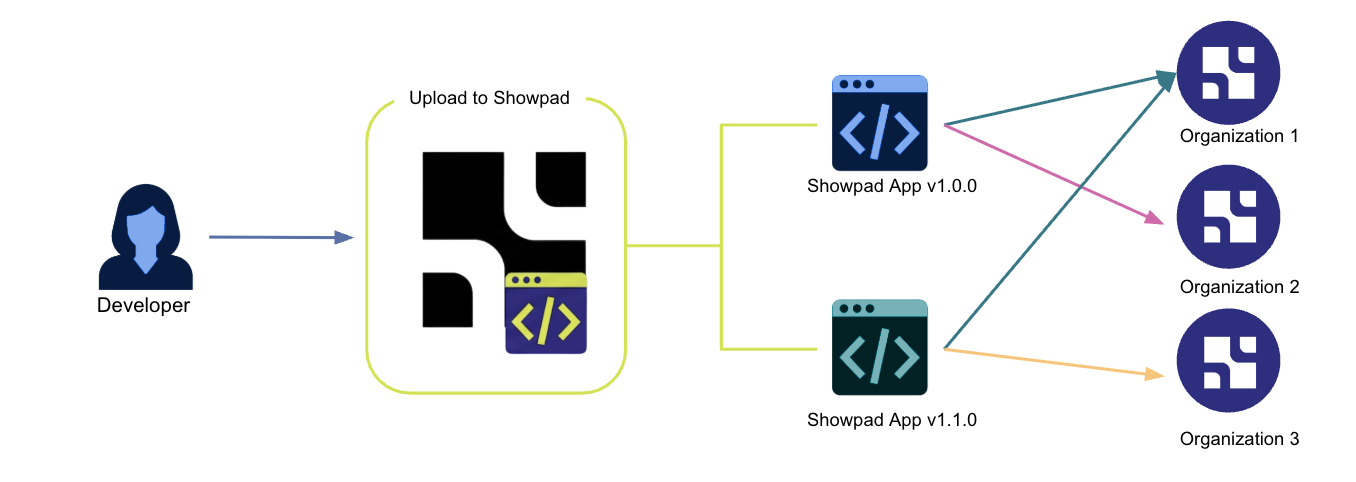
When you upload a Showpad App to your organization, the app is automatically assigned to it. From there, you can then assign it to other Showpad organizations.
In order to enable local testing or to distribute Showpad Apps, you need a Partner certified organization (sandbox). If you don't have access to a sandbox and are an existing partner, please contact your Partner Manager. Alternatively, if you're new to Showpad, you can find out more about our Partner Program on our Partners page.
Please contact your Customer Success Manager if you're interested in having access to a development sandbox.
Tools
Code Editor
A reliable code editor is essential to write your code quickly and efficiently. We highly recommend using Visual Studio Code, but you're free to use your preferred code editor.
Node.js
Node.js is a cross-platform, open-source JavaScript runtime environment. You can download the Node.js source code or a pre-built installer for your platform from the Node.js download page.
Transpiler
When using modern versions of ECMAScript, you should transpile your code in order to ensure maximum compatibility with browsers. We recommend that you use Babel or other similar tools.
Showpad Developer Toolkit
The Developer Tools section covers the Showpad SDK and CLI in detail.
Development Workflow
There are four phases for creating a Showpad App:
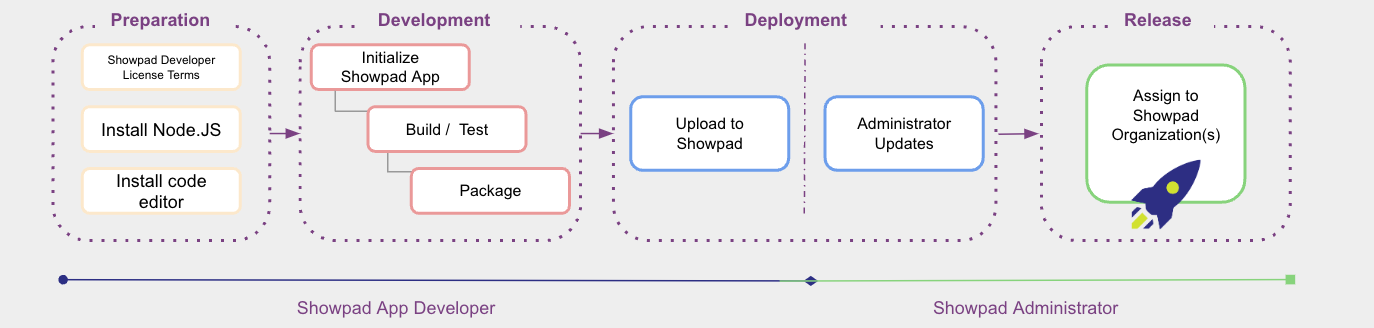
| Phase | Description |
|---|---|
| Preparation | Set up your environment, plan your app, and configure authentication. |
| Development | Build your app using the SDK and CLI, then test locally. |
| Deployment | Bundle and upload your app, then assign it to organizations. |
| Release | Organization admins configure and publish your app to their users. |
Next Steps
- Before You Build - Design considerations and best practices
- Development Checklist - Make sure you have everything ready
Was this page helpful?