Subscriptions
Subscriptions tell Showpad which events you would like to receive notifications about. Each subscription is defined by its:
-
Type - Designates when webhooks are created and the content of the payload. For example,
shared-space-createdwebhooks are sent whenever a Shared Space is created. The payload contains the details of the Shared Space and the user that created it. -
Endpoint - The destination where Showpad sends notifications for the specified event type.
- Admin App: Navigate to Settings → Webhooks to create subscriptions via the UI
- API: Send
POSTrequests to/webhooks/v1/subscriptionsto create subscriptions programmatically - Signature key: Store securely after creation - it's only shown once
What you'll learn
- How to create webhook subscriptions via the Admin App or API
- How to update and delete subscriptions
- How to view subscription logs and monitor webhook activity
- Plan: Ultimate with Enterprise add-on | Advanced | Expert
- Permissions: Administrator access to Showpad's Admin App
- Authentication: Valid OAuth 2.0 access token (learn more)
Admin App
The following section describes how to manage your subscriptions on Showpad's Admin App.
Subscribe to Events
| Step | Description |
|---|---|
| 1. | Sign in to Showpad's Admin App and open Settings. |
| 2. | Click on Webhooks in the Integrations section.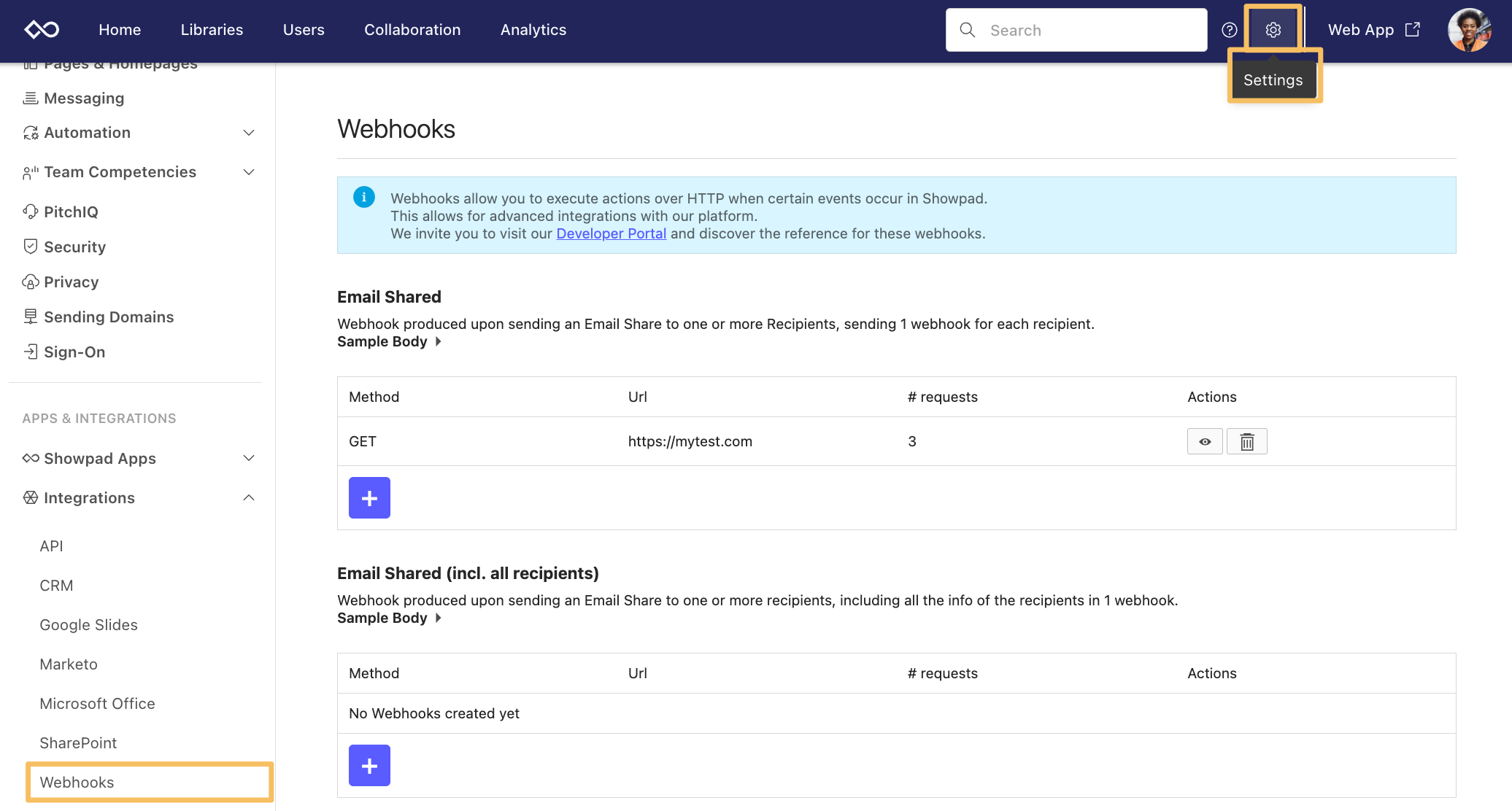 Note: If you don't see Webhooks in the Integrations section, contact your Showpad administrator. |
| 3. | Select the event that applies to your automation and click the + icon to add a webhook. Your middleware service should be mapped to the event using the identifiers in the Sample Body. To see a sample of what Showpad sends to your webhook URL, click Sample Body (in this example, we use the Sharing event). 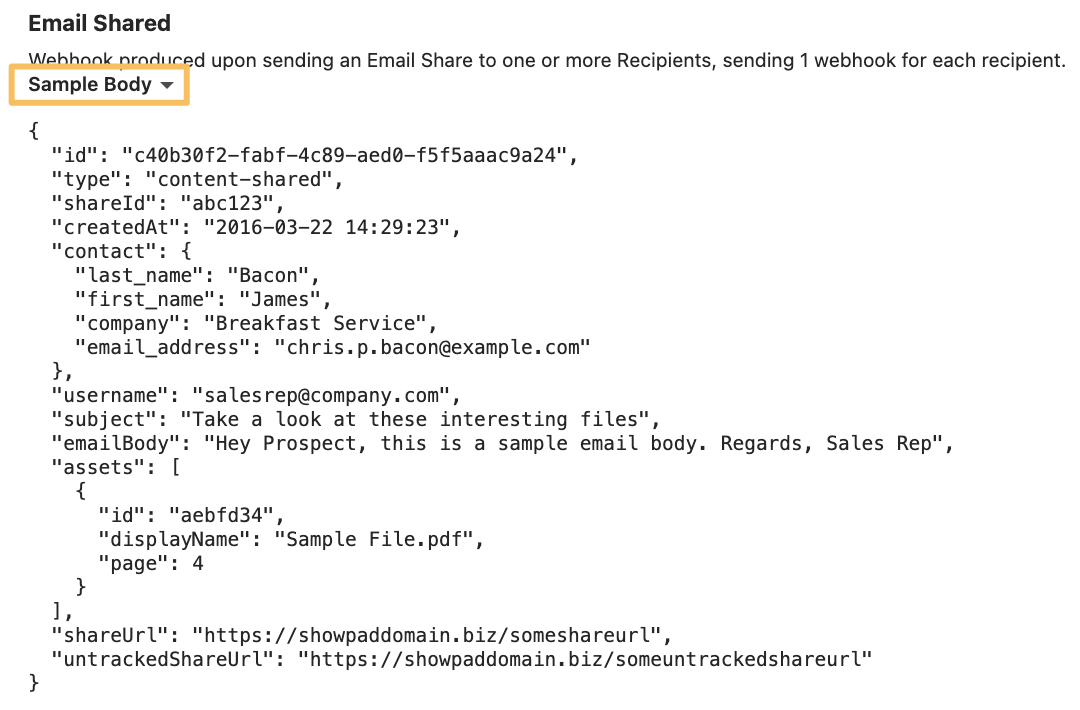 |
| 4. | Select an HTTP method (GET or POST) to define how events are delivered to the webhook URL. |
| 5. | Add the URL that is used to accept webhook events and confirm. You can see how many requests an event has sent to a webhook by the number in the # requests column. |
| 6. | After successfully creating the webhook subscription, a signature key is displayed. 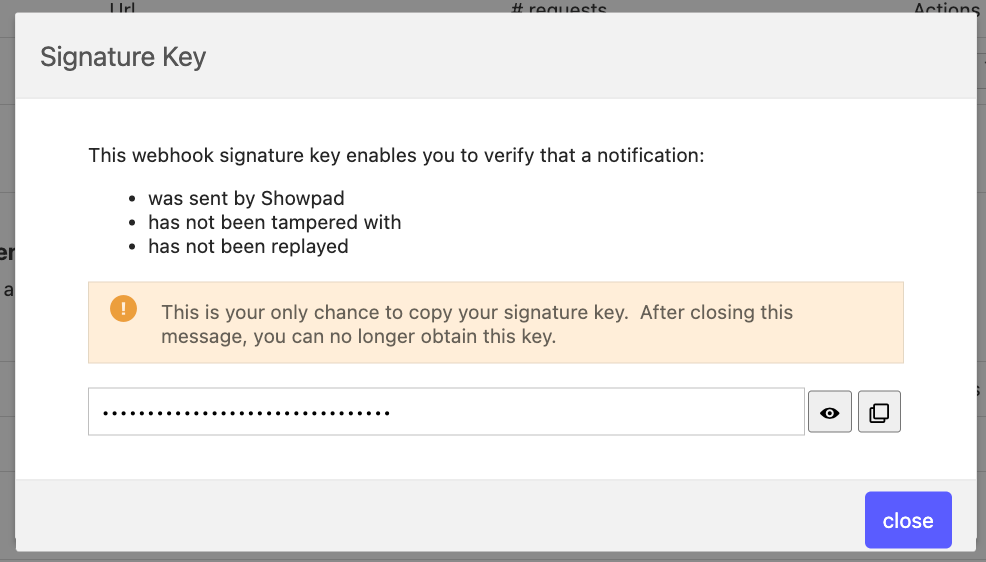 The signature key can be used to ensure the authenticity and integrity of the webhook. For more information, see the webhook verification section. Note: The signature key is only visible once. Be sure that you copy and store it in a secure location. |
Additional Actions
You can monitor the responses from webhook requests by clicking on the View icon or delete the existing method by clicking on the Delete icon.

| Action | Description |
|---|---|
| View Logs | Clicking the View icon displays Showpad's Webhook Log.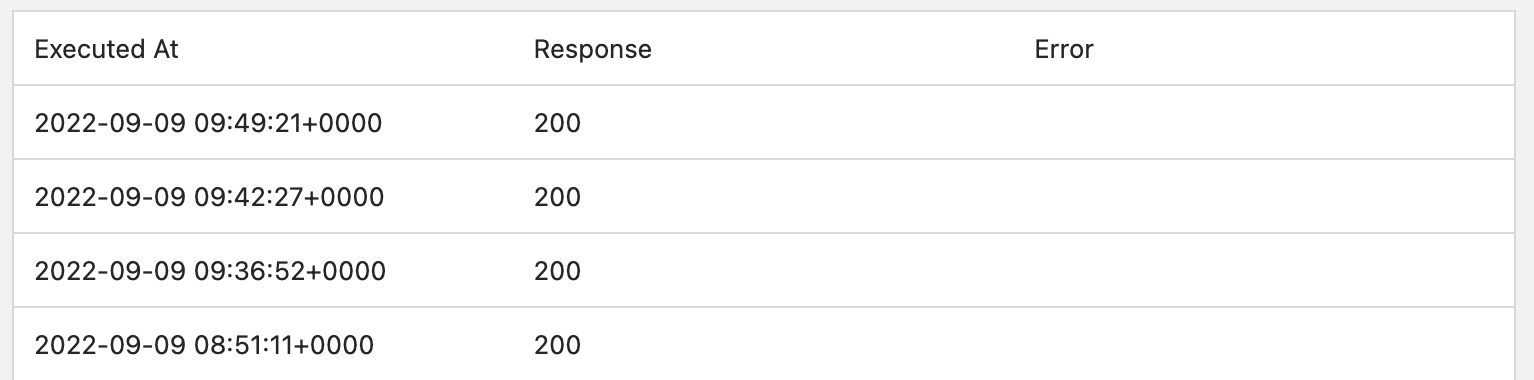 The columns in the log display:
|
| Delete Subscriptions | Clicking the Delete icon permanently removes the webhook and all of its log history. A dialog is displayed to confirm the deletion. |
API Requests
Subscribing to events via the API is done by sending requests to the subscriptions endpoint at
https://{{subdomain}}.api.showpad.com/webhooks/v1... using an
HTTP method.
Each subscription request has its own unique structure, depending on the endpoint. Verify that your requests conform to the structure defined in the API Specification.
You'll need to use your developer API token when making requests to these endpoints.
New Subscription
Creating a new webhook subscription and its signature key requires the following HTTP method and endpoint:
| HTTP Method | Endpoint | Request body required? |
|---|---|---|
POST | /subscriptions | Yes |
You can check out the API Specification for more information.
Example
- cURL
- JavaScript
- Python
curl --request POST \
  --url https://{{subdomain}}.api.showpad.com/webhooks/v1/subscriptions \
  --header 'Authorization: Bearer {access_token}' \
  --header 'Content-Type: application/json' \
  --data '{
  "name": "my webhook",
  "url": "https://my-domain.com/incoming-webhook",
  "method": "GET",
  "headers": [
    {
      "name": "Authorization",
      "value": "Bearer xyz"
    },
    {
      "name": "User-Agent",
      "value": "Showpad-Webhook-Agent"
    }
  ],
  "types": [
    "COURSE_COMPLETED"
  ]
}'
const response = await fetch('https://{{subdomain}}.api.showpad.com/webhooks/v1/subscriptions', {
  method: 'POST',
  headers: {
    Authorization: 'Bearer {access_token}',
    'Content-Type': 'application/json',
  },
  body: JSON.stringify({
    name: 'my webhook',
    url: 'https://my-domain.com/incoming-webhook',
    method: 'GET',
    headers: [
      { name: 'Authorization', value: 'Bearer xyz' },
      { name: 'User-Agent', value: 'Showpad-Webhook-Agent' },
    ],
    types: ['COURSE_COMPLETED'],
  }),
});

const data = await response.json();
console.log(data);
import requests

response = requests.post(
    'https://{{subdomain}}.api.showpad.com/webhooks/v1/subscriptions',
    headers={
        'Authorization': 'Bearer {access_token}',
        'Content-Type': 'application/json'
    },
    json={
        'name': 'my webhook',
        'url': 'https://my-domain.com/incoming-webhook',
        'method': 'GET',
        'headers': [
            {'name': 'Authorization', 'value': 'Bearer xyz'},
            {'name': 'User-Agent', 'value': 'Showpad-Webhook-Agent'}
        ],
        'types': ['COURSE_COMPLETED']
    }
)

data = response.json()
print(data)
Response
{
  "id": "01GVZ8663CJAREF2SJE5XQRX7W",
  "url": "https://my-domain.com/incoming-webhook",
  "name": "my webhook",
  "createdAt": "2023-03-20T10:14:09.772Z",
  "updatedAt": "2023-03-20T10:14:09.772Z",
  "headers": [
    { "name": "Authorization", "value": "Bearer xyz" },
    { "name": "User-Agent", "value": "Showpad-Webhook-Agent" }
  ],
  "method": "GET",
  "types": ["COURSE_COMPLETED"],
  "signatureKey": "5a2d7b35c8427ae4bfe3aa39fe75b68c"
}
The API response includes a signatureKey. It is important to copy and securely store this key as it will only be
visible once. To ensure the authenticity and integrity of the webhook, the signature key can be used to verify the
webhook signature. Refer to the instructions provided in the webhook verification section to
learn how to do this.
Update Subscription
Updating a webhook subscription requires the following HTTP method and endpoint:
| HTTP Method | Endpoint | Request body? |
|---|---|---|
POST | /subscriptions/{id}Note: The subscription identifier must be included. | Yes |
You can check out the API Specification for more information.
Example
- cURL
- JavaScript
- Python
curl --request POST \
  --url https://{{subdomain}}.api.showpad.com/webhooks/v1/subscriptions/119bc1766eb2433990e5e06412a99f07 \
  --header 'Authorization: Bearer {access_token}' \
  --header 'Content-Type: application/json' \
  --data '{
  "name": "my webhook",
  "url": "https://my-domain.com/incoming-webhook",
  "method": "GET",
  "headers": [
    { "name": "Authorization", "value": "Bearer xyz" },
    { "name": "User-Agent", "value": "Showpad-Webhook-Agent" }
  ],
  "types": ["COURSE_COMPLETED"]
}'
const response = await fetch(
  'https://{{subdomain}}.api.showpad.com/webhooks/v1/subscriptions/119bc1766eb2433990e5e06412a99f07',
  {
    method: 'POST',
    headers: {
      Authorization: 'Bearer {access_token}',
      'Content-Type': 'application/json',
    },
    body: JSON.stringify({
      name: 'my webhook',
      url: 'https://my-domain.com/incoming-webhook',
      method: 'GET',
      headers: [
        { name: 'Authorization', value: 'Bearer xyz' },
        { name: 'User-Agent', value: 'Showpad-Webhook-Agent' },
      ],
      types: ['COURSE_COMPLETED'],
    }),
  }
);

const data = await response.json();
console.log(data);
import requests

response = requests.post(
    'https://{{subdomain}}.api.showpad.com/webhooks/v1/subscriptions/119bc1766eb2433990e5e06412a99f07',
    headers={
        'Authorization': 'Bearer {access_token}',
        'Content-Type': 'application/json'
    },
    json={
        'name': 'my webhook',
        'url': 'https://my-domain.com/incoming-webhook',
        'method': 'GET',
        'headers': [
            {'name': 'Authorization', 'value': 'Bearer xyz'},
            {'name': 'User-Agent', 'value': 'Showpad-Webhook-Agent'}
        ],
        'types': ['COURSE_COMPLETED']
    }
)

data = response.json()
print(data)
Delete Subscription
Deleting a webhook subscription requires the following HTTP method and endpoint:
| HTTP Method | Endpoint | Request body? |
|---|---|---|
DELETE | /subscriptions/{id}Note: The subscription identifier must be included. | No |
You can check out the API Specification for more information.
Example
- cURL
- JavaScript
- Python
curl --request DELETE \
  --url https://{{subdomain}}.api.showpad.com/webhooks/v1/subscriptions/119bc1766eb2433990e5e06412a99f07 \
  --header 'Authorization: Bearer {access_token}'
const response = await fetch(
  'https://{{subdomain}}.api.showpad.com/webhooks/v1/subscriptions/119bc1766eb2433990e5e06412a99f07',
  {
    method: 'DELETE',
    headers: { Authorization: 'Bearer {access_token}' },
  }
);
import requests

response = requests.delete(
    'https://{{subdomain}}.api.showpad.com/webhooks/v1/subscriptions/119bc1766eb2433990e5e06412a99f07',
    headers={'Authorization': 'Bearer {access_token}'}
)
Lists & Logs
The following sections describe how to retrieve information about your subscriptions and view the logs.
Single Subscription
Retrieving a single webhook subscription requires the following HTTP method and endpoint:
| HTTP Method | Endpoint | Request body? |
|---|---|---|
GET | /subscriptions/{id}Note: The subscription identifier must be included. | No |
You can check out the API Specification for more information.
Example
- cURL
- JavaScript
- Python
curl --request GET \
  --url https://{{subdomain}}.api.showpad.com/webhooks/v1/subscriptions/119bc1766eb2433990e5e06412a99f07 \
  --header 'Authorization: Bearer {access_token}'
const response = await fetch(
  'https://{{subdomain}}.api.showpad.com/webhooks/v1/subscriptions/119bc1766eb2433990e5e06412a99f07',
  {
    headers: { Authorization: 'Bearer {access_token}' },
  }
);

const data = await response.json();
console.log(data);
import requests

response = requests.get(
    'https://{{subdomain}}.api.showpad.com/webhooks/v1/subscriptions/119bc1766eb2433990e5e06412a99f07',
    headers={'Authorization': 'Bearer {access_token}'}
)

data = response.json()
print(data)
All Subscriptions
Retrieving a list of all webhook subscriptions requires the following HTTP method and endpoint:
| HTTP Method | Endpoint | Request body? |
|---|---|---|
GET | /subscriptions | No |
You can check out the API Specification for more information.
Example
- cURL
- JavaScript
- Python
curl --request GET \
  --url https://{{subdomain}}.api.showpad.com/webhooks/v1/subscriptions \
  --header 'Authorization: Bearer {access_token}'
const response = await fetch('https://{{subdomain}}.api.showpad.com/webhooks/v1/subscriptions', {
  headers: { Authorization: 'Bearer {access_token}' },
});

const data = await response.json();
console.log(data);
import requests

response = requests.get(
    'https://{{subdomain}}.api.showpad.com/webhooks/v1/subscriptions',
    headers={'Authorization': 'Bearer {access_token}'}
)

data = response.json()
print(data)
Subscription Logs
Retrieving the logs for a single webhook subscription requires the following HTTP method and endpoint:
| HTTP Method | Endpoint | Request body? |
|---|---|---|
GET | /subscriptions/{id}/logsNote: The subscription identifier must be included. | No |
You can check out the API Specification for more information.
Example
- cURL
- JavaScript
- Python
curl --request GET \
  --url https://{{subdomain}}.api.showpad.com/webhooks/v1/subscriptions/119bc1766eb2433990e5e06412a99f07/logs \
  --header 'Authorization: Bearer {access_token}'
const response = await fetch(
  'https://{{subdomain}}.api.showpad.com/webhooks/v1/subscriptions/119bc1766eb2433990e5e06412a99f07/logs',
  {
    headers: { Authorization: 'Bearer {access_token}' },
  }
);

const data = await response.json();
console.log(data);
import requests

response = requests.get(
    'https://{{subdomain}}.api.showpad.com/webhooks/v1/subscriptions/119bc1766eb2433990e5e06412a99f07/logs',
    headers={'Authorization': 'Bearer {access_token}'}
)

data = response.json()
print(data)
Next steps
- Understand notification payloads and event data structure
- Verify webhook signatures to secure your endpoint
Was this page helpful?